Tuesday, January 22, 2013

تحميل برامج برامج تصميم المواقع والبرمجة

تحميل برامج برامج تصميم المواقع والبرمجة والتعامل مع قواعد البيانات


programss برامج تصميم المواقع والبرمجة والتعامل مع قواعد البياناتphpdesigner2007pe

HOTFILE


weditor
برنامج رائع لتصميم المواقع


HOTFILE


viart_shop


HOTFILE


MyDB-install
للتعامل مع قواعد البيانات والتعديل عليها


HOTFILE


navicat8_lite

للتعامل مع قواعد البيانات والتعديل عليها

HOTFILE


miniPHP Studio


HOTFILE

تحميل برنامج الحمايه avg

تحميل برنامج الحمايه الرائع ايه اف جى برنامج حماية أكثر من رائع (إصدار مجاني)
برنامج حماية أكثر من رائع (إصدار مجاني)
avg

للتحميل من هنا

برنامج الرائع لتفريغ الاشرطة 2013


السلام عليكم ورحمة الله وبركاته
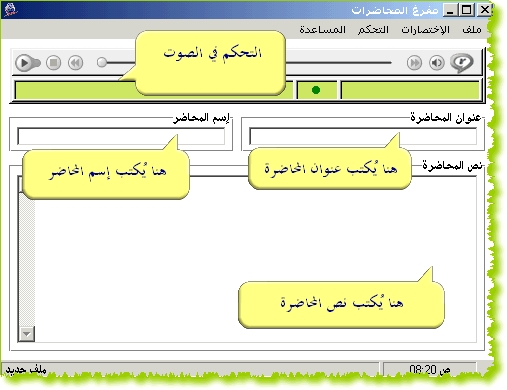
اليكم هذا البرنامج الرائع لتفريغ الاشرطة و هو برنامج أسمه مفرغ الصوتيات يساعد على تفريغ الدروس بيسر وسهولة باذن الله وإليكم رابط التحميل:
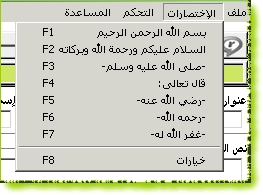
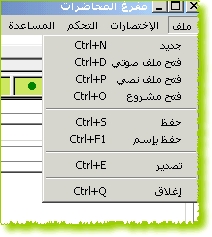
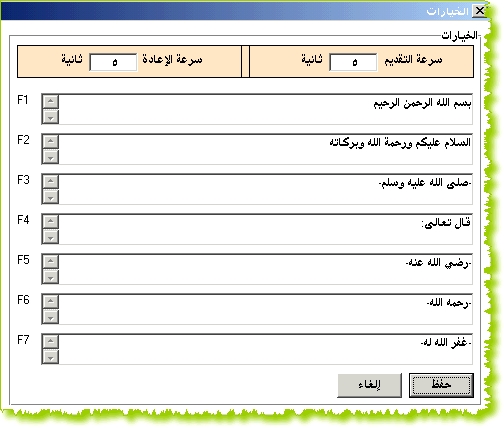
لشرح استخدام البرنامج فقد نقلت إليكم صور لبيان مميزات البرنامج
خصائص البرنامج:-
1- إمكانية تشغيل جميع الانواع التي يقوم برنامج RealOne بتشغيلها,, وإن شاء الله لن يحتاج تثبيت برنامج الـRealOne
2- إمكانية تشغيل/إيقاف الشريط بالضغط على زر "F12"
3- إمكانية إعادة الشريط لمدة تحددها انت في خيارات البرنامج بالثواني.
4- إمكانية تقديم الشريط لمدة تحددها انت في خيارات البرنامج بالثواني.
5- إمكانية إضافة 7 إختصارات من F1 إلى F7.
6- إمكانية حفظ المشروع:-
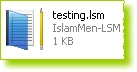
وهذه الخاصية مفيدة عند تفريغ محاضره طويله,, فمثلا لو قمت بتفريغ نصف المحاضره ووصل الشريط إلى الدقيقه "45:30" واضطررت للتوقف, فيمكنك حفظ المشروع بحيث يخزن بالصيغة التالي "FileName.lsm" ثم في اي وقت يمكن تشغيل الملف "FileName.lsm" فسيعمل البرنامج تلقائياً وسيظهر عنوان المحاضرة في خانة العنوان وكذلك إسم المحاضر ونص المحاضره وسيقوم بختيار المحاضره والذهاب تلقائيا إلى الدقيقه "45:25" وبهذا يمكن إكمال التفريغ..

7- الآن بالإمكان تخزين المشروع بصيغة "TXT"

بعد الضغط على حفظ بإسم, يمكن إختيار الإمتداد كما هو موضع في الصورة

8- يمكن تصدير المحاضره بشكل صفحة ويب "html"وستظهر بهذا الشكل:-

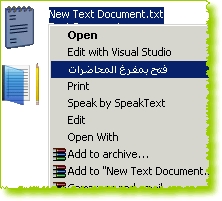
9- بعد التثبيت يمكن الضغط بزر الفأرة الايمن على اي ملف نصي ثم إختيار "فتح بمفرغ المحاضرات" وسيتم فتح الملف النصب بواسطة البرنامج.

- تمت تم بحمد الله إضافة خاصية البحث في القرآن الكريم..
وهذه صور توضيحيه


-----------

------------

-------------

-------------

--------------
7- يمكن تصدير المحاضره بشكل ملف نصي, وسيظهر بهذا الشكل:-

8- يمكن تصدير المحاضره بشكل صفحة ويب "html"وستظهر بهذا الشكل:-

9- بعد التثبيت يمكن الضغط بزر الفأرة الايمن على اي ملف نصي ثم إختيار "فتح بمفرغ المحاضرات" وسيتم فتح الملف النصب بواسطة البرنامج.


هذه روابط تحمل شرح مجسد لاستخدام البرنامج

شرح كيفية التثبيت:


شرح تشغيل البرنامج


شرح خيارات البرنامج


شرح خاصية البحث في القرآن الكريم


شرح فتح ملف جديد وبدء التفريغ و حفظ المشروع


شرح فتح مشروع تم حفظه مسبقا


الموضوع الاصلي:
-----------
islammen.net
---
قام بالبرنامج الأخ المطور / أيوب
---
التحميل:
-----------
http://www.islammen.net/ar/download/p1/lsm-setup_5.exe
----------------------
نقل لكم للفائدة

أتبرأ من استخدام البرنامج فى معصية الله

برنامج fire fox بديل لبرنامج internet explorer 2013


السلام عليكم ورحمة الله وبركاته
programs برنامج fire fox بديل لبرنامج internet explorer 2013
برنامج fire fox بديل لبرنامج internet explorer


عربى هنا

وانجليزى هنا

برنآمج Adobe Photoshop cs3 Me


programs برنآمج Adobe Photoshop cs3 Me النسخه الكامله و الداعمه للغه العربيه 2013
بسم الله الرحمن الرحيم 


مــرحــبآ أخــوانـــي آلأعــزآء نظرآ لكثـــره طلب برنـــآمج آلفوتــوشـوب آلعــآشر 
و آلدآعــمـ للغهـ آلعربيهـ نسخهـ كآمــلهـ وحفاظ علي قوانين المنتدي تم حذف السير/يال 

فقد أحضرت لــكمـ آليــومـ نسخهـ ممتازهـ من آلفوتــوشوب آلإصدآر cs3 
نسخـهـ آلشرق آلأوســط

وهذا الموضوع اهــــــداء للاخ الفاضل Mohamed.R 

[مــمــيزآت آلنســخـهـ] :


اقتباس:
Photoshop latest version Adobe Photoshop CS3 Extended ME version in support of writing in Arabic

Ideal for film, video, and multimedia professionals and graphic and web designers 
using 3D and motion,
as well as professionals in engineering and science,
Adobe® Photoshop® CS3 Extended software delivers everything in Photoshop CS3 and more.
Render and incorporate 3D images into your 2D composites.
Stop time with easy editing of motion graphics on video layers. 
And probe your images with measurement, analysis, and visualization tools.

Nondestructive editing 

Edit nondestructively with new Smart Filters, 
which let you visualize different image effects, and Smart Objects, which let you scale,
rotate, and warp raster and vector graphics �" all without altering the original pixel data.

Rich painting and drawing toolset 

Create or modify images with a wide assortment of professional, 
fully customizable paint settings, artistic brushes, and drawing tools.

Advanced compositing 

Create more accurate composites by automatically aligning multiple Adobe® Photoshop® 
layers or images based on similar *******. 
The Auto-align Layers command quickly analyzes details and moves, rotates, 
or warps layers to align them perfectly, and the Auto-blend Layers command
blends the color and shading to create a smooth, editable result.

3D compositing and texture editing 

Easily render and incorporate rich 3D ******* into your 2D composites �" even edit existing 
textures on 3D models directly within Photoshop Extended and immediately see the results. 
Photoshop Extended supports common 3D interchange formats,
including 3DS, OBJ, U3D, KMZ, and COLLADA, so you can import, view,
and interact with most 3D models.

Movie Paint 

Enhance video directly within Photoshop Extended. Now you can paint, add text, 
and clone over multiple frames of an imported video sequence.

2D and 3D measurement tools 

Extract quantitative information from images with new measurement tools. 
Easily calibrate or set the scale of an image, and then use any of the Photoshop 
Extended selection tools to define and calculate distance, perimeter,
area, and other measurements. Record data points in a measurement log and
export data, including histogram data, to a spreadsheet for further analysis.

Faster, more flexible asset management with Adobe Bridge CS3 

Organize and manage images more efficiently with next-generation Adobe Bridge CS3 software, 
which now delivers improved performance, a Filter panel for easier searching,
the ability to group multiple images under a single thumbnail, the Loupe tool, 
offline image browsing, and more.

Better raw-image processing 

Process raw images with increased speed and superior conversion quality using the 
Photoshop Camera 
Raw plug-in, which now adds support for JPEG and TIFF formats;
new tools including Fill Light and Dust Busting; compatibility with Adobe Photoshop Lightroom™ 
software; and support for over 150 camera models.

Enhanced Vanishing Point with 3D support 

Edit in perspective on multiple surfaces �" even those connected at angles 
other than 90 degrees �" 
with the enhanced Vanishing Point, which also lets you measure in perspective;
wrap graphics, images, 
and text around multiple planes; and output 2D planes as 3D models.

Wide range of supported formats 

Import and export an even greater range of file formats, including PSD, BMP, 
DICOM, Cineon, JPEG, JPEG2000, OpenEXR, PNG, Targa, and TIFF.

System requirements 


Microsoft® Windows® XP with Service Pack 2 or Windows Vista™ Home Premium,
Business, Ultimate, or 
Enterprise (certified for 32-bit editions) 
512MB of RAM 
64MB of video RAM 
1GB of available hard-disk space (additional free space required during installation) 
1,024x768 monitor resolution with 16-bit video card 
DVD-ROM drive 
QuickTime 7 software required for multimedia features 
Internet or phone connection required for product activation 
Broadband Internet connection required for Adobe Stock Photos* and other services Intel® Pentium® 4, Intel Centrino®, Intel Xeon®, or Intel Core™ Duo (or compatible) processor

برنآمج Adobe Photoshop cs3 Me


programs برنآمج Adobe Photoshop cs3 Me النسخه الكامله و الداعمه للغه العربيه 2013
بسم الله الرحمن الرحيم 


مــرحــبآ أخــوانـــي آلأعــزآء نظرآ لكثـــره طلب برنـــآمج آلفوتــوشـوب آلعــآشر 
و آلدآعــمـ للغهـ آلعربيهـ نسخهـ كآمــلهـ وحفاظ علي قوانين المنتدي تم حذف السير/يال 

فقد أحضرت لــكمـ آليــومـ نسخهـ ممتازهـ من آلفوتــوشوب آلإصدآر cs3 
نسخـهـ آلشرق آلأوســط

وهذا الموضوع اهــــــداء للاخ الفاضل Mohamed.R 

[مــمــيزآت آلنســخـهـ] :


اقتباس:
Photoshop latest version Adobe Photoshop CS3 Extended ME version in support of writing in Arabic

Ideal for film, video, and multimedia professionals and graphic and web designers 
using 3D and motion,
as well as professionals in engineering and science,
Adobe® Photoshop® CS3 Extended software delivers everything in Photoshop CS3 and more.
Render and incorporate 3D images into your 2D composites.
Stop time with easy editing of motion graphics on video layers. 
And probe your images with measurement, analysis, and visualization tools.

Nondestructive editing 

Edit nondestructively with new Smart Filters, 
which let you visualize different image effects, and Smart Objects, which let you scale,
rotate, and warp raster and vector graphics �" all without altering the original pixel data.

Rich painting and drawing toolset 

Create or modify images with a wide assortment of professional, 
fully customizable paint settings, artistic brushes, and drawing tools.

Advanced compositing 

Create more accurate composites by automatically aligning multiple Adobe® Photoshop® 
layers or images based on similar *******. 
The Auto-align Layers command quickly analyzes details and moves, rotates, 
or warps layers to align them perfectly, and the Auto-blend Layers command
blends the color and shading to create a smooth, editable result.

3D compositing and texture editing 

Easily render and incorporate rich 3D ******* into your 2D composites �" even edit existing 
textures on 3D models directly within Photoshop Extended and immediately see the results. 
Photoshop Extended supports common 3D interchange formats,
including 3DS, OBJ, U3D, KMZ, and COLLADA, so you can import, view,
and interact with most 3D models.

Movie Paint 

Enhance video directly within Photoshop Extended. Now you can paint, add text, 
and clone over multiple frames of an imported video sequence.

2D and 3D measurement tools 

Extract quantitative information from images with new measurement tools. 
Easily calibrate or set the scale of an image, and then use any of the Photoshop 
Extended selection tools to define and calculate distance, perimeter,
area, and other measurements. Record data points in a measurement log and
export data, including histogram data, to a spreadsheet for further analysis.

Faster, more flexible asset management with Adobe Bridge CS3 

Organize and manage images more efficiently with next-generation Adobe Bridge CS3 software, 
which now delivers improved performance, a Filter panel for easier searching,
the ability to group multiple images under a single thumbnail, the Loupe tool, 
offline image browsing, and more.

Better raw-image processing 

Process raw images with increased speed and superior conversion quality using the 
Photoshop Camera 
Raw plug-in, which now adds support for JPEG and TIFF formats;
new tools including Fill Light and Dust Busting; compatibility with Adobe Photoshop Lightroom™ 
software; and support for over 150 camera models.

Enhanced Vanishing Point with 3D support 

Edit in perspective on multiple surfaces �" even those connected at angles 
other than 90 degrees �" 
with the enhanced Vanishing Point, which also lets you measure in perspective;
wrap graphics, images, 
and text around multiple planes; and output 2D planes as 3D models.

Wide range of supported formats 

Import and export an even greater range of file formats, including PSD, BMP, 
DICOM, Cineon, JPEG, JPEG2000, OpenEXR, PNG, Targa, and TIFF.

System requirements 


Microsoft® Windows® XP with Service Pack 2 or Windows Vista™ Home Premium,
Business, Ultimate, or 
Enterprise (certified for 32-bit editions) 
512MB of RAM 
64MB of video RAM 
1GB of available hard-disk space (additional free space required during installation) 
1,024x768 monitor resolution with 16-bit video card 
DVD-ROM drive 
QuickTime 7 software required for multimedia features 
Internet or phone connection required for product activation 
Broadband Internet connection required for Adobe Stock Photos* and other services Intel® Pentium® 4, Intel Centrino®, Intel Xeon®, or Intel Core™ Duo (or compatible) processor

برنامج التعريب


Radialix

تحميل بنامج  Radialix لتعريب اى برنامج للغه العربيه 
رنامج تعريب البرامج عربي بالكامل وتصدير واستيراد بجميع وكل الصيغ المعروفة والغير معروفة لديك

برنامج Radialix الرائد والافضل وذو الواجهة والتطبيق العربي وطبعاً التعريب من الاخ شريف شطا وهذا الوصف خاص به ايضاً


من مميزات برنامج 

Radialix والإمكانيات التي يتمتع بها

1. البرنامج يحتوي علي 11ملف محلل لغوي مختلف وذكي وتلقائي ويمتلك 31 قالب للنص (قاعدة صرفية) يعني يعرب أغلب الملفات النصية كمان
2. يحتوي علي 13 فلتر للترجمة والمفاجأة يحتوي علي فلتر حسب طول الترجمة كما يمكننا من رؤية الترجمات المحذوفة كمان
3. يحتوي البرنامج علي 5 محركات ترجمة مباشرة علي الشبكة الإنترنت وبينها مترجم ميكروسوفت ومترجم جوجل كما يمتاز عن غيره في معاينة الترجمة التلقائية قبل إعتمادها يعني إذا لم تعجبنا الترجمة التلقائية المباشرة لسلسة ما ,لانعتمدها
4. يدعم البرنامج اللغة العربية الي حد مقبول ويدعم الكتابة بالعربية الي حد كبير
5. يستورد البرنامج من ملفات ذاكرات Csv + Glo + Txt + Tmx + Xls + Lg3 وملفات مشاريعة كمان بالصيغة Rdlp وملفات ذاكراته العملاقة والعظيمة Rdmp وأخيرآ الملفات المعربة التنفيذية والنصية كمان أمثال LNi + Lng والدلات كمان
6. ويصدر علي هيئة Rdmp + Csv + Glo + Txt + Tmx + Xls يعني ملهوش حل
7. عند ترجمة المشروع بالكامل من ذاكرة الترجمة الخاصة بالبرنامج يترجم كل المشروع ويترك لك التكرارات في الأخر تختار فيما بينها كل سلسلة علي حده
8. يمكنك عند الإتصال بذاكرة الترجمة الخاصة بالبرنامج Rdmp أن تعدل وتضيف وتنسق سلاسلها
9. يستطيع البرنامج تحرير ذاكرة الترجمة الخاصة به Rdmp أي بالإستيراد من أي صيغة والتصدير لاي صيغة أيضاً بل والتعديل عليها فيمكنك إضافة الصيغ التالية لذاكرة الترجمة Csv + Glo + Txt + Tmx
10. يمكننا إضافة كل ما عربناه في ذاكرة البرنامج المتصلة بالمشروع أو ذاكرة ترجمة جديدة كما يمكننا التعديل عليها أيضاً والأدهي من ذلك يترجم ويعدل كمان إدخال النص و التكرارات في كامل المشروع ويشمل بذلك ذاكرة ترجمة المشروع (مفاجأة)
11. بهذا يتفوق علي ملتيليزر 6 ويتفوق علي ملتيليزر 9 وثلاث برامج أخري عملاقة لما يمتلكه من قدرات في الترجمة وترجمة ملفات اللغة النصية وسهولة أدواته وغيرها
12. يعرب كل الصيغ المتعارف عليها وفيما بينها ملفات TXT , CSV , INI , LNG وبهذا يغنينا عن برامج كثيرة يدوية قديمة ويساعدنا علي إنشاء حزم لغوية للبرامج
13. يمتلك محررات مرئية كثيرة منها محررات سلسلة محرر للصورة محرر للتكرارات محرر لذاكرة الترجمة محرر للتدقيق
14. يمكننا عمل أكثر من لقطة لبعض المشاهد في البرنامج عند إغلاقه ويمكننا التبديل فيما بينها
15. يحتوي أمر التراجع عن إجراء في البرنامج علي 16 تراجع عام بما فيها تنسيق المربعات والترجمات


إرشادات حول البرنامج

1. يختلف هذا البرنامج عن غيره من برامج التعريب الأخري فلابد أن تقف علي عقدة اللغة علي يسار البرنامج للعمل عليها ويستحسن أن تعرض مدير المشروع حتي لاتتوه في مصادر البرنامج
2. عند إضافة ذاكرة الترجمة الخاصة به Rdmp لابد أن تعمل لها إتصال حتي تفعلها وإذا أضفت أكثر من ذاكرة لابد أن تنشط الذاكرة التي تريد الترجمة منها
3. البرنامج تجريبي ولم نحصل علي سريال له فعد تعريب البرامج به يمكننا أن نعدل علي حالات سلاسل البرنامج R أي القراءة فقط ونعمل لها تبديل للتجاهل أي نزيل تلك العلامة وبهذا يمكننا تعريب البرامج به بالكامل وليس فقط 50% كما البرامج التجريبة الأخري وبهذا سنستمتع بتعريبه والبرنامج مفتوح لمدة 30 يوماً مجانا وبعدها يتوجب عليك شراء البرنامج.
4. التدقيق في مشروع ذاكرة الترجمة يختلف عن التدقيق في مشروع التعريب لنفس المشروع الواحد يعني لانقلق عند تدقيق ذاكرة الترجمة المتصلة بالمشروع وسيطلب منك حفظ التعديل علي ذاكرة الترجمة
5. ملفات مشروع ذاكرة ترجمة يمكن للبرنامج أن ينشأ هذه الملفات بأحد الصيغ التالية.Rdmp - ملف مشروع ذاكرة ترجمة بالصيغة XML .Rdmz - ملف مشروع ذاكرة ترجمة محزوم بالصيغة Binary. Professional Tool for Software Localization

* Localization of PE32, PE32+ and RES files
* Localization of .NET Framework 1.0..4.0 and .NET Compact Framework 1.0..3.5 assemblies and resource files
* Localization of WPF BAML resources
* Localization of Gettext PO and MO files
* Localization of text files
* Translation of hard-coded strings
* Plug-ins for IDA
* Unicode support
* Auto-translation, including fuzzy matching
* Machine translation
* Translation validation check
* WYSIWIG editor for dialogs, forms and menus
* Export and import XLS, CSV, TMX and TXT files
* Translation Memory editor
* Proj


تاريخ الاصدار